

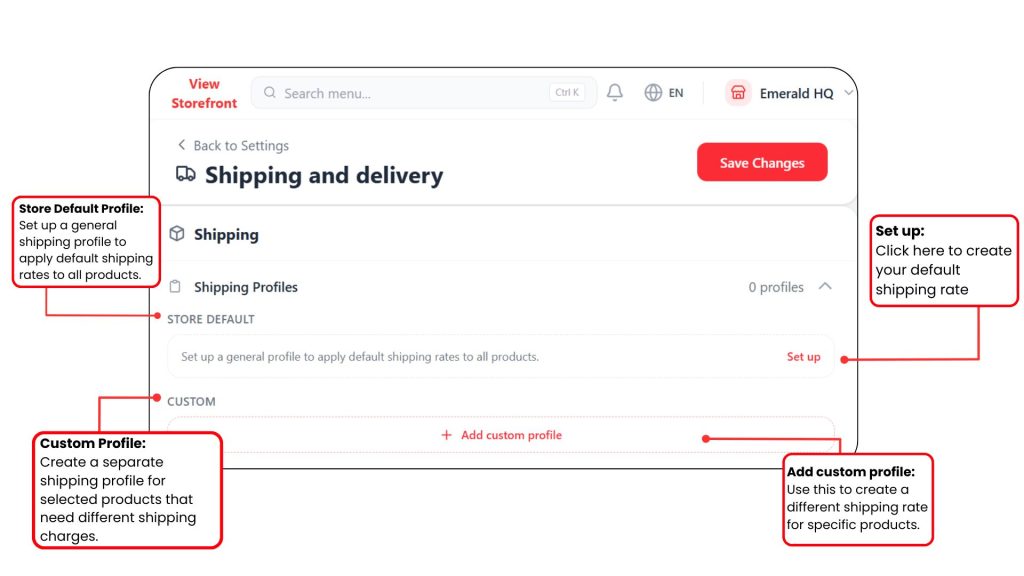
Shipping Profile is used to manage shipping rates for your products.
There are two types of shipping profiles:
- Store Default Profile
- Custom Profile
Store Default Profile
This is the main shipping profile for your store. It applies to all products that are not assigned to any custom profile.
For example, if most of your products use the same shipping rate, you can set the rate under the Store Default Profile.
Custom Profile
Custom Profile is used when certain products need different shipping rates.
For Example:
| Product Situation | Suggestion Profile |
| Most products use the same shipping fee | Store Default Profile |
| Frozen food needs special delivery rate | Custom Profile |
| Bulky item has higher shipping fee | Custom Profile |
| Selected products have free shipping | Custom Profile |
Now let’s do the Store Default Profile first!