

iPay88 is a payment gateway that allows your customers to make online payments through FPX, credit/debit card, and other supported online payment methods.
Once your iPay88 account is approved and connected with JustOrder.Today, customers can select iPay88 as a payment option during checkout.
Before You Start #
Before integrating iPay88 with your shop, you need to apply for an iPay88 merchant account first.
If you already have an approved iPay88 account, you may skip to STEP 5: Connect iPay88 with Your Store
STEP 1: Apply for an iPay88 Merchant Account
#
From your admin dashboard, go to Settings > Payments.
At the top of the Payments page, click Apply for Payment Gateway.
Under the list of available payment providers, find iPay88 and click Apply (if you do not have a iPay88 account yet and would like to create a new one)
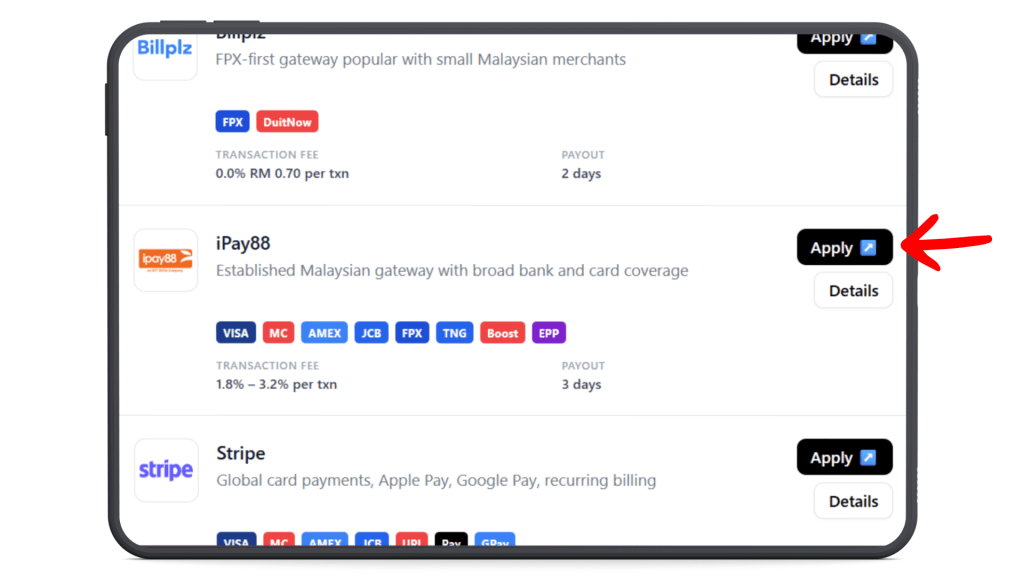
To start your iPay88 new application, send an email to iPay88 support at: #
In the email, mention that you would like to create an iPay88 merchant account.
You may include the following basic business information:
- Company name
- Business registration number
- Email address
- Contact number
- Your shop website or store link, if available
Sample email:
Hi iPay88 Team,
I would like to apply for an iPay88 merchant account for my business.Company Name:
Business Registration Number:
Email Address:
Contact Number:
Shop Website / Store Link:Kindly assist with the onboarding process. Thank you
STEP 2: Complete the iPay88 Onboarding Process #
After iPay88 receives your request, their onboarding team or account manager will contact you by email.
They may provide:
- A unique e-onboarding link
- Available iPay88 plan or fee structure
- List of required documents
- Further instructions to complete your application
Follow the instructions given by iPay88 and submit all required information through their onboarding form.
Note: The onboarding process may be different depending on your business type, selected plan, or iPay88’s latest requirement.
STEP 3: Get the Required Integration URL #
During the iPay88 onboarding process, you may be required to provide your shop integration URLs.
You can get these details from your JustOrder.Today admin dashboard.
From your admin dashboard:
- Go to Settings.
- Click Payments.
- Find iPay88 under the payment gateway section.
- Click Apply
- A popup will appear showing the required iPay88 integration details.
- Copy the details from the popup and provide them to iPay88 when requested
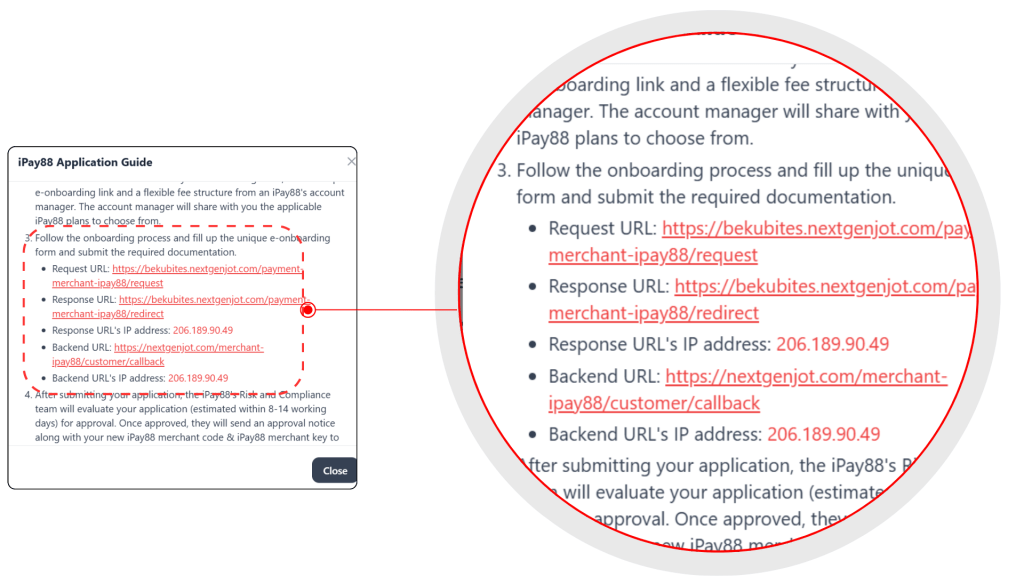
Make sure you copy the URL exactly as shown in the popup, as the URL is generated based on your shop domain.
STEP 4: Wait for iPay88 Approval #
After you submit your application, iPay88’s Risk and Compliance team will review your application.
The approval process usually takes around 8–14 working days.
Once approved, iPay88 will send the following details to your registered email address:
- iPay88 Merchant Code
- iPay88 Merchant Key
You will need these details to connect iPay88 with your JustOrder.Today shop.
STEP 5: Connect iPay88 with Your Store #
Once your iPay88 application has been approved, go to menu Settings > Payments in your JustOrder.Today admin dashboard.
Under the payment provider list, find iPay88 and click Connect.
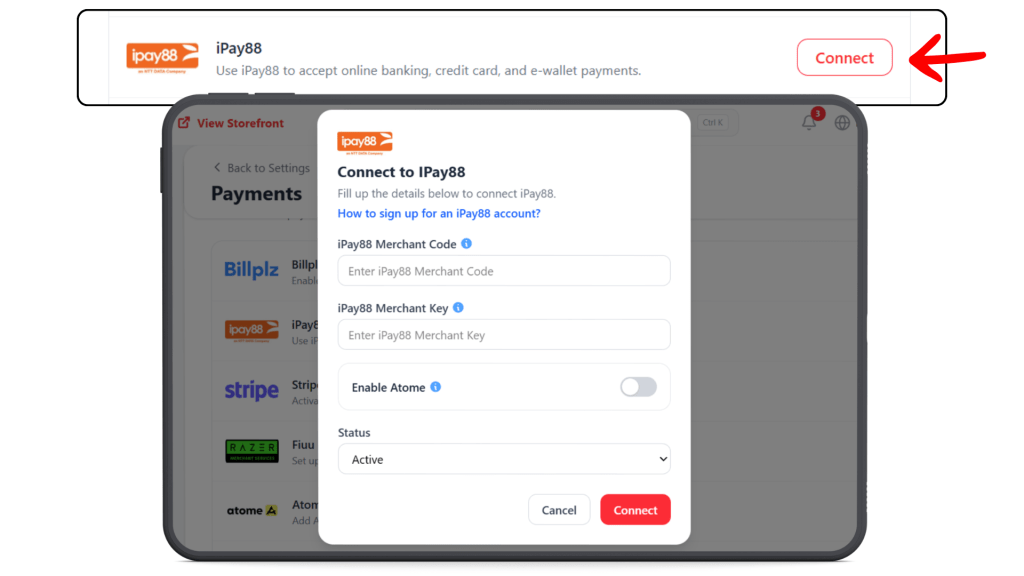
A pop-up form will appear. Fill in the required iPay88 connection details.
Make sure all details are entered correctly to avoid connection errors.
Set the status to Active, then click Connect to complete the setup.
Once saved, customers will be able to make online payment during checkout using the payment methods supported by your iPay88 setup