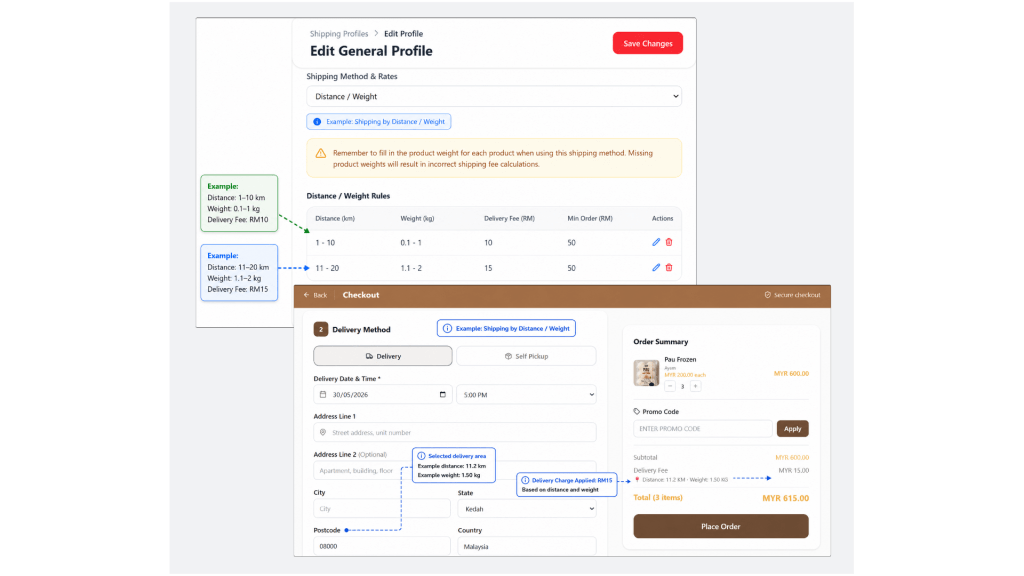

Distance / Weight Shipping allows you to charge shipping fees based on the delivery distance and product weight.
This method is suitable if your shipping fee depends on how far the delivery location is and how heavy the order is.
The system will automatically calculate the delivery distance based on the merchant’s address and the customer’s delivery address.
Based on the distance range, product weight, and delivery fee set by the merchant, the system will calculate the shipping fee and charge it to the customer during checkout.
Important: Make sure your store address and product weight are updated correctly. Missing or incorrect address or product weight may affect the shipping fee calculation during checkout.
To set up Distance / Weight Shipping in your Store Default Profile: #
- Go to Settings > Shipping and Delivery.
- Under Shipping Profiles, click your Store Default Profile.
- You will be directed to the Edit General Profile page.
- Under Shipping Method & Rates, select Distance / Weight.
- Click Add Rule.
- Fill in the required details.
- Click Add or Save to save the rule.
- Once completed, click Save Changes on the main page.
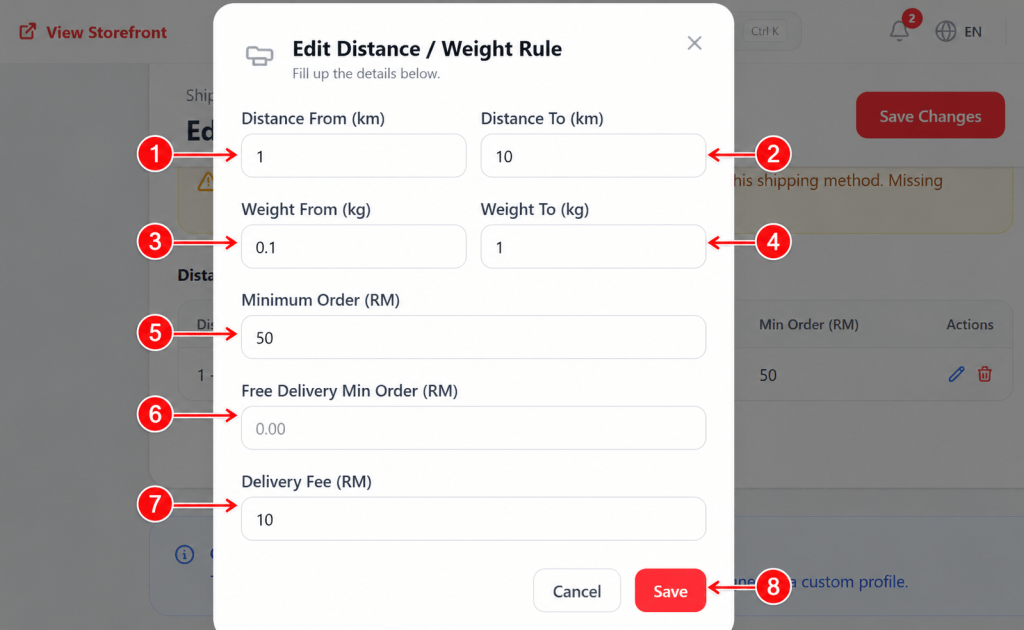
Fill in the Distance / Weight Rule
When adding a Distance / Weight rule, complete the following details:
| Field / Action | What to Fill in |
|---|---|
| 1. Distance From (km) | Enter the starting delivery distance for this rule. Example: 1km |
| 2. Distance To (km) | Enter the ending delivery distance for this rule. Example: 10km |
| 3. Weight From (kg) | Enter the starting product weight range for this rule. Example: 0.1kg |
| 4. Weight To (kg) | Enter the ending product weight range for this rule. Example: 1kg |
| 5. Minimum Order (RM) | Enter the minimum order amount required for this rule to apply. Example: If you enter 50, this rule will apply when the customer’s order is RM50 or above. If there is no minimum order requirement, leave it as 0.00. |
| 6. Free Delivery Min Order (RM) | Enter the minimum order amount required for the customer to enjoy free delivery. If you do not want to offer free delivery, leave it as 0.00. |
| 7. Delivery Fee (RM) | Enter the shipping fee that will be charged to the customer when the order matches the distance and weight range. Example: 10 means the customer will be charged RM10 for delivery. |
| 8. Save | Click Save to save this distance / weight rule. To add another rule, click Add Rule again and repeat the same steps. Once all rules are added, click Save Changes on the main page. |